Today I wanted to see if I could get a Java Spring Boot app talking to App Configuration in Azure to consume some dummy configuration as a simple proof of concept.
https://docs.microsoft.com/en-us/azure/azure-app-configuration/overview
Azure App Config is a powerful tool for storing configuration, references to secrets in key vaults and it also has feature flag functionality. Microsoft have been clever here with this service and combined 3 distinct concepts into a ‘One Stop Shop’ place in which to retrieve your app’s config.
I set about creating a simple app Java Spring app, I created a simple template using the helpful Spring Initializer and accepted all the defaults.
This created a demo.zip folder which was downloaded locally and then added the following files:-
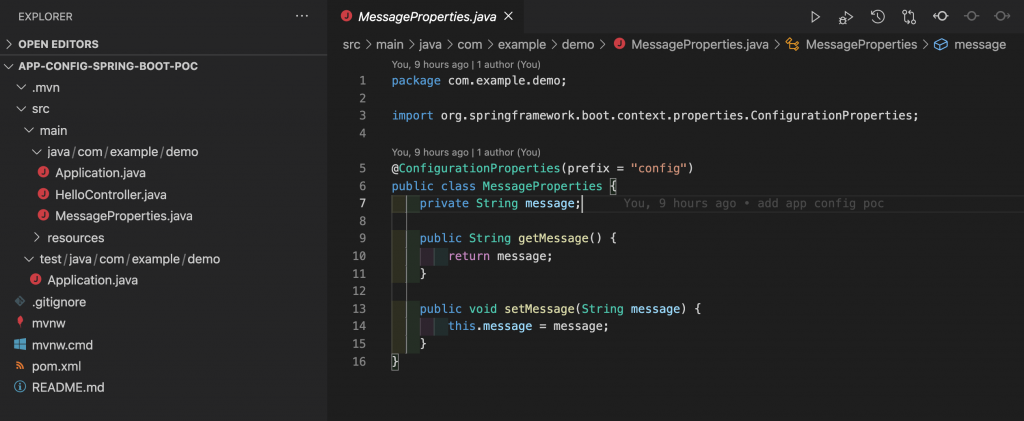
MessageProperties.java file in my package folder in my case src/main/java/com/example/demo
package com.example.demo;

import org.springframework.boot.context.properties.ConfigurationProperties;

@ConfigurationProperties(prefix = "config")
public class MessageProperties {
    private String message;

    public String getMessage() {
        return message;
    }

    public void setMessage(String message) {
        this.message = message;
    }
}
HelloContoller.java
package com.example.demo;

import org.springframework.web.bind.annotation.RestController;
import org.springframework.web.bind.annotation.RequestMapping;

@RestController
public class HelloController {
    private final MessageProperties properties;

    public HelloController(MessageProperties properties) {
        this.properties = properties;
    }

    @RequestMapping("/")
    public String index() {
        return "Message: " + properties.getMessage();
    }
}
Application.java
package com.example.demo;

import java.util.Arrays;

import org.springframework.boot.CommandLineRunner;
import org.springframework.boot.SpringApplication;
import org.springframework.boot.autoconfigure.SpringBootApplication;
import org.springframework.context.ApplicationContext;
import org.springframework.context.annotation.Bean;

import org.springframework.boot.context.properties.EnableConfigurationProperties;


@SpringBootApplication
@EnableConfigurationProperties(MessageProperties.class)
public class Application {

	public static void main(String[] args) {
		SpringApplication.run(Application.class, args);
	};

}
And finally add an reference to the environment variable to get the connection string to the App Config instance in a bootstrap.properties file in your resources folder
bootstrap.properties
spring.cloud.azure.appconfiguration.stores[0].connection-string= ${APP_CONFIGURATION_CONNECTION_STRING}
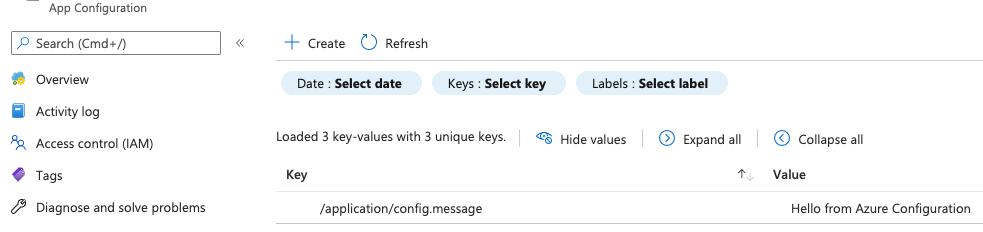
There is a pre-req to have an Azure App Configuration instance running and a configuration key:-
/application/config.message
and a value of:-
Hello from Azure Configuration
Like this….
Also you will need to grab the Connection string from the ‘Access Keys’ section of App Configuration and add it to the export to set the environment variable.
export APP_CONFIGURATION_CONNECTION_STRING='Endpoint=https://my-azure-app-config.azconfig.io;Id=xxxxxxxxxxx;Secret=Ixxxxxxxxxxxxxxxxxx'

mvn clean package

mvn spring-boot:run
Goto http://localhost:8080 in your browser and observe the config pulled from Azure App Config – it works!